Choose which comic fields display on product pages
The Comic Details block exposes a toggle for every field it can render. Use them to control which rows show up on every product page.
Open the settings
In Online Store → Themes → Edit theme, switch to your product template, and click the Comic Details block in the canvas (or in the left sidebar) to open its settings panel. Settings are grouped into three headers: Product fields, Credits, and Variant fields.
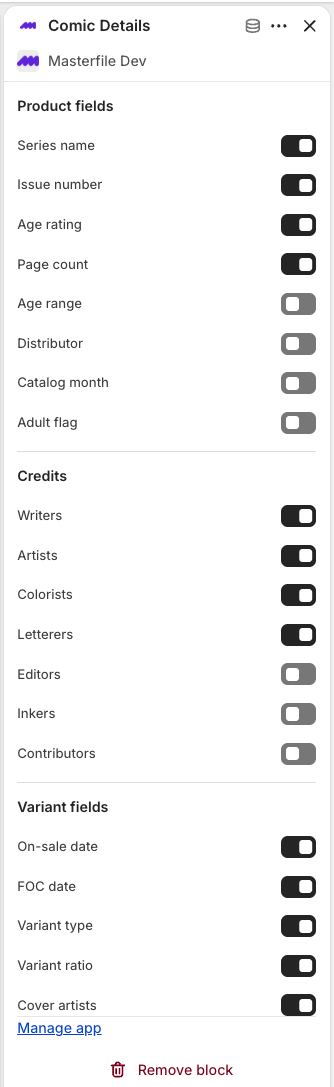
How visibility works
A row renders when both are true:
- The toggle for that field is on.
- The product (or selected variant) actually has a value for that field.
Turning a toggle off hides the row on every product. Turning it on still hides the row on products with no value for that field — Comic Details never renders empty rows. See A theme block isn't appearing if the block disappears entirely.
Product fields
Product-level toggles. Default state in parentheses.
- Series name (on) — the series the issue belongs to.
- Issue number (on) — the issue's number within its series.
- Age rating (on) — publisher rating (e.g. T, T+, Mature).
- Page count (on) — number of pages.
- Age range (off) — recommended reader age range.
- Distributor (off) — PRH or Lunar.
- Catalog month (off) — the distributor catalog month the issue shipped in.
- Adult flag (off) — whether the issue is flagged Adult.
Credits
Per-role contributor toggles. Each renders as a comma-separated list when the field has values.
- Writers (on)
- Artists (on)
- Colorists (on)
- Letterers (on)
- Editors (off)
- Inkers (off)
- Contributors (off)
Variant fields
Variant-level toggles. These rows swap automatically when the shopper picks a different variant.
- On-sale date (on) — the date the issue is expected on shelves.
- FOC date (on) — the distributor's final order cutoff for that issue.
- Variant type (on) — variant mechanic (e.g. Variant cover, Ratio, Open Order).
- Variant ratio (on) — the ratio for incentive variants, rendered as
1:N. - Cover artists (on) — the cover artists for that specific variant.
Save
Click Save in the theme editor. Changes are live on your storefront immediately.
Related
- Configure your Shopify product theme — initial setup for the block.
- Customize pre-order and subscription labels — settings for the other two storefront blocks.