Help a customer cancel their subscription
Requires the Retailer Ops plan. Compare plans.
Cancellation is self-serve — the customer does it from their Shopify account. You can't cancel on their behalf from the Masterfile dashboard. Your job is to point them to the right screen.
The path
Direct the customer to:
- Sign in to their Shopify account on your store.
- Open My Subscriptions.
- Click the card for the series they want to cancel.
- Click Cancel Subscription at the bottom of the detail page.
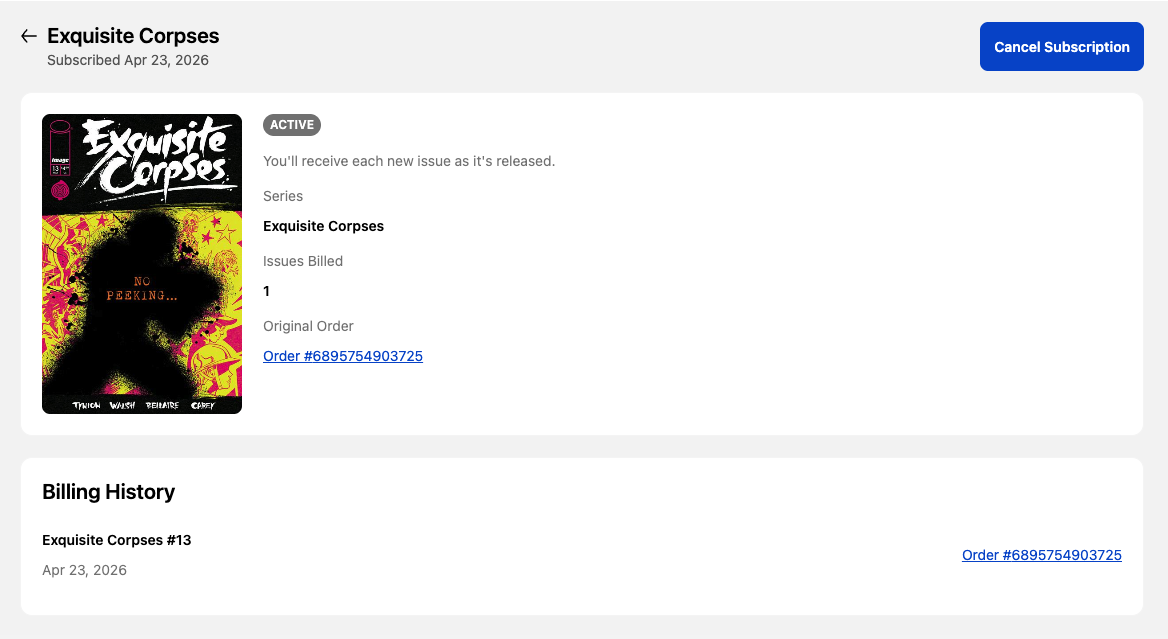
If they can't find the My Subscriptions page, see A customer says their account pages are missing.
What happens after
- No further issues bill. Renewals stop immediately.
- The subscription's status flips to Cancelled on Subscriptions.
- Previous orders are untouched — anything already billed still ships with the next distributor order.
- Cancellation is final. Re-subscribing means buying a new issue with the Subscribe option.
- If you need to refund any outstanding orders, you can do so in Shopify.
See About subscriptions for the full lifecycle.