Customize catalog page filters and sort
Adjust which filters customers see in the storefront sidebar of your catalog page. Changes take effect immediately — no theme republish.
1. Open the catalog settings
Go to Storefront Catalog. The Catalog Filters card lists every filter available to your store, with a live storefront preview on the right.
2. Toggle filters on or off
Each row is a filter. Flip the switch to include or exclude it from the sidebar. The count next to Catalog Filters updates as you go.
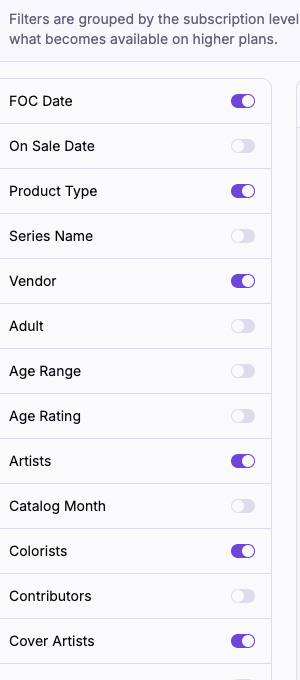
Filter options come from the metafields on your active products — the list reflects what's actually in your catalog.
Pre-order and In stock
Two boolean filters work differently from the rest:
- Pre-order — variants with a future FOC date and overselling enabled. These are open for orders now and ship once the issue arrives.
- In stock — variants with at least one inventory location holding positive on-hand stock. Excludes anything that's untracked or only purchasable via overselling.
When a customer ticks one of these in the sidebar, the catalog narrows to products with at least one variant matching. A product can match both at once if it has variants in each state.
Locked rows show a small colored dot — grey for Requires Catalog, orange for Requires Distributor Operations. The legend above the list maps each color to a plan. Upgrade your plan to unlock them.
3. Save
The Save button is disabled until you change a toggle. Click it to publish.

Enabled filters appear in the storefront sidebar on the next page load. Disabled filters drop out of the sidebar.
Sort options
Sort is not configurable. The storefront catalog always offers relevance, title (A–Z, Z–A), newest, oldest, recently updated, vendor, and product type. Relevance is the default.
Related
- Set up your catalog page — initial setup and menu link.
- Choose which comic fields display on product pages — the companion setting for the product detail template.